

For students
Practise with familiar examples and terms from your own lessons – in the app or on paper. No more guessing what might come up.



Learn with your own school material
Pigglefox turns your school material into practice. Scan pages, build word lists and questions, practise in the app or on paper. With Pro, Pigglefox reads your pages – handwriting included – and creates the exercises for you.
Coming soon – Pigglefox is not in the App Store yet.
Start for free, upgrade to Pro whenever you like.

The curriculum sets the frame. But how a topic is explained, which examples and terms come up, and what matters in the test differs from class to class. That's why generic workbooks and learning apps often only half fit. Pigglefox starts right there – the exercises grow out of the material that is actually used for learning. That makes Pigglefox a valuable addition to everyday studying.
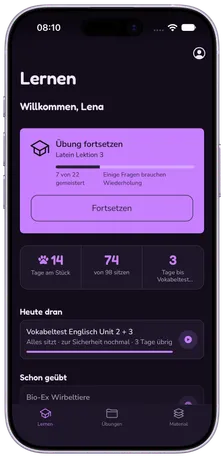
Pick up where you left off
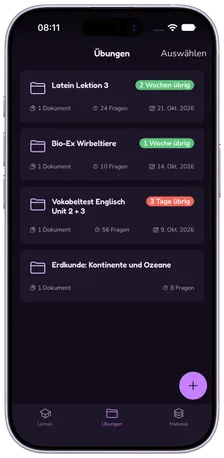
Exercises with a countdown to the test
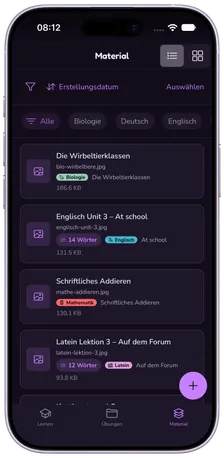
Your material, sorted by subject
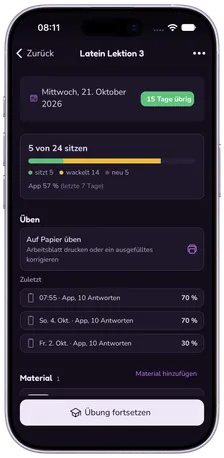
Learning state – what sticks, what wobbles
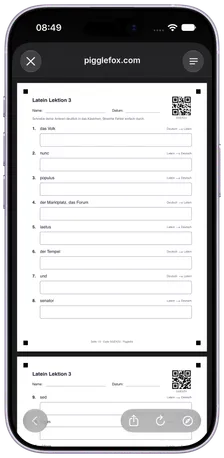
Print as a worksheet – and correct it from a photo
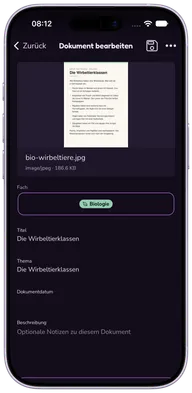

Step 1
Scan a textbook page, notebook entry or worksheet with your phone – edges are found and straightened automatically. That's already part of Free.
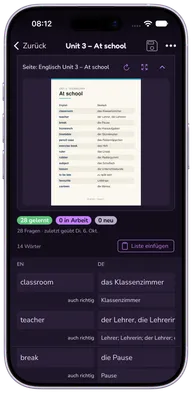

Step 2
Pigglefox reads the page – handwriting included – and turns it into word lists with example sentences or into questions. Automatically, or with the question types you pick.
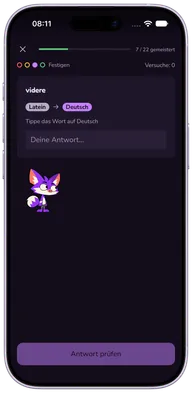

Step 3
In the app or on a printed worksheet. Whatever went wrong comes back until it sticks – and Pigglefox cheers you on.
Practise with familiar examples and terms from your own lessons – in the app or on paper. No more guessing what might come up.

Support your child's learning without inventing exercises yourself – with printable worksheets and an answer key. And without explaining things differently from the teacher.
Even in Free, you collect textbook pages, notebook entries and worksheets in the app – sorted by subject and topic and bundled for the next test. Nothing goes missing right before the exam.
Small spelling slips still count and the correct spelling is shown. Capitals and punctuation are pointed out, not marked wrong.
Curious, proud, excited – nervous after a few mistakes and relieved when it works again. Always with the child, never against them.
Practise vocabulary English → German and German → English, or just one way.
An open practice run can be continued later. Whatever went wrong comes back until it sticks.
Stored pages can be attached to an exercise – even without Pro. A word list typed off such a page is practised right along with it.
Instead of scanning, you can also pick photos and PDFs from your library.
Confirmed worksheet results flow into the learning state exactly like practice in the app.
The app comes in German and English, in light and dark mode.
Do it yourself
Free
Pigglefox reads for you
€4.99 / month
Coming soon – Pro will be available right in the app.
Pigglefox is a learning companion, not a replacement for lessons. No ads, no tracking, no analytics tools, no selling of data. Your learning material is visible to your account only. Data is stored on servers in Germany. With Pro, pages go to Mistral AI in France for text recognition – never used for training – and without Pro they go nowhere. And deleting your account deletes everything – photos included.

In Free you scan pages, build word lists and questions yourself and practise in the app or on paper. With Pro, Pigglefox reads your pages – handwriting included – and creates word lists and questions automatically. Storage is no longer limited to 100 pages either.
No. Scanning, storing (up to 100 pages) and practising are all part of Free. You need Pro if you want Pigglefox to read the pages and create the exercises for you.
Vocabulary in many language pairs – German, English, French, Spanish, Italian, Latin and more. Content pages become questions: multiple choice, free text, several answers or grammar gaps.
No. Pigglefox helps with practising and revising what was taught at school. The teacher's explanations remain the foundation.
Yes. You can print a worksheet from any exercise – with 10, 20 or all questions and large answer boxes. Parents get the answer key as a separate PDF. With Pro you photograph the filled-in sheet, Pigglefox reads the answers and you confirm them.
Your pages are accessible through your account only and are stored on servers in Germany. Without Pro they are not sent to anyone. With Pro they go to Mistral AI (France) for text recognition and to IONOS (Germany) for questions – only to return the result, and never for training. Photos of filled-in worksheets are deleted once you confirm the correction. If you delete your account, everything is permanently deleted after 30 days – photos included.
Yes. Pro is a subscription through the App Store and can be cancelled at any time in the subscription settings of your App Store account.
On iPhone and iPad – with its own iPad layout – and in the browser as a web version. There is no Android app at the moment.
Pigglefox has big ears and loves to listen. Drop us a line!